
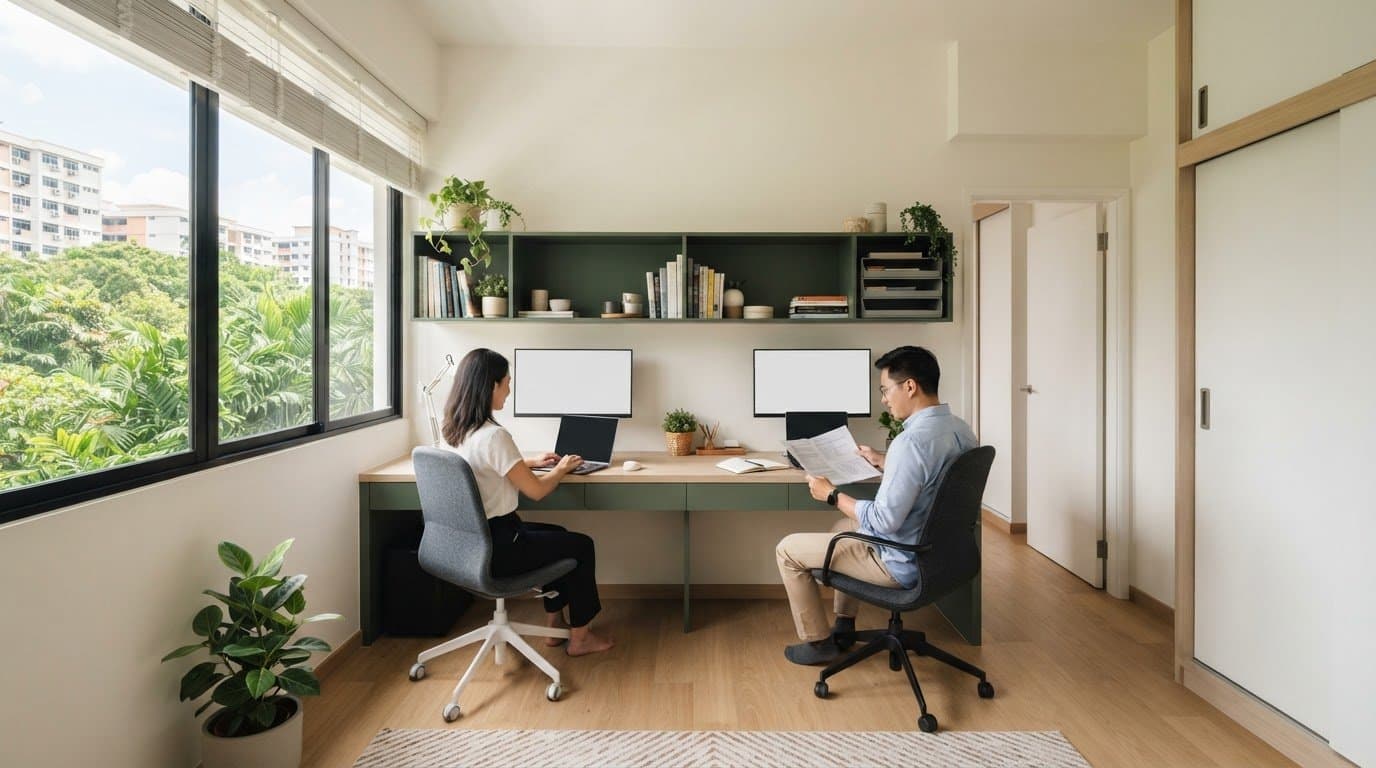
Home office ideas for small hdb room that make shared work easier
Discover smart home office ideas for small HDB room setups. Learn how to arrange shared desks, tidy cables, and plan storage so you work easily every day.
A shared home office works best when each person has a defined place to work, store essentials and manage cables. The most practical home office ideas for a small HDB room start with a compact desk that fits without blocking doors, wardrobes or walkways. Separate power access, storage and work boundaries help both people settle in and pack away at the end of the day.
Two people don’t necessarily need a larger room. Thoughtful placement can make a shared setup feel organised without taking over the space. This guide covers how to choose a work zone, position a desk, manage cables and draw inspiration from designs suited to a small Singapore home. You’ll also find ways to give each person enough elbow room and a clear place for work essentials.
Key Takeaways
- Plan cable routes and power-point access around where each person works to keep the shared setup tidy and practical.
- Choose a work zone that suits the room, preserves access to everyday storage and can be cleared when work ends.
- Compare desk size and placement with the space needed to sit, move and use work equipment comfortably.
- Use distinct work boundaries and storage to help each person stay organised without making the room feel crowded.
- Explore space-saving desk and storage approaches that suit your room layout and shared-work routine.
Table of Contents
- 1. Cable management and power-point placement
- 2. Choosing a work zone by room type
- 3. Compact desk selection and placement
- 4. Design ideas and inspiration
- 5. Which space-saving desks and storage solutions work best in small rooms?
- FT2 Interior Design: HDB BTO Home Renovation
1. Cable management and power-point placement
Common mistakes include trailing leads across walkways, overcrowding adapters and continuing to use damaged cords. These can create trip or electrical risks, so keep cables visible, orderly and clear of walkways.
Map the shared desk before arranging plugs. Mark where each person’s laptop, monitor, desk lamp and charger will go. Note which devices need power and how far their cables reach. This simple plan shows whether the existing power points suit the layout and helps prevent a last-minute tangle behind the desk.
Place the desk near available power points when the layout allows, and keep sockets accessible rather than trapped behind drawers or heavy furniture. If two people share a desk, map each person’s devices separately. For example, one work zone might hold a laptop charger and monitor, while the other accommodates a second laptop. Don’t stretch a cable across either person’s chair space.
Route each lead along a desk edge or wall, not across the floor. Use cable clips or a tray to group cords beneath the tabletop. Leave enough slack to move a laptop safely, but avoid loose loops near feet. Keep charging cables clear of chair wheels, drawer runners and the path to the door. In a compact HDB room, these small choices preserve usable floor space.
Measure the walkway after setting up the desk and chair. Where possible, leave around 70-90 cm for the main route through a compact home. A cable crossing that route reduces clear floor space, even when tucked against a wall. Check the route from the doorway to the bed, wardrobe, or living area. Move the cable path or desk if it interrupts daily movement.
Light placement also affects cable planning. Position a task lamp so it doesn’t cast a shadow over your writing hand. A west-facing room may receive strong UV, which can fade upholstery, dry some finishes and worsen screen glare. Avoid placing a screen where direct afternoon light falls across it. Keep lamp wires close to the desk’s rear edge, away from the writing surface.
Before work begins, check the setup together. Confirm both people can reach their plugs without pulling on someone else’s cable. Make sure cords don’t obstruct drawers, doorways or chair movement. If a power point is far from the desk, reconsider the desk position before adding loose leads. A tidy cable plan keeps the work zone clear and easy to reset after the workday.
2. Choosing a work zone by room type
Yes, an HDB bedroom can double as a work zone. Keep wardrobe access clear, preserve the room’s sleeping function and pack work items away after hours. These practical layout choices help the room serve both purposes without suggesting a separate HDB regulation.
To separate work from rest, place the desk along one wall and define its boundary with a desk mat, task light or small organiser. Keep the bed and wardrobe accessible, then store papers and devices after work.
In a bedroom, start with the wall that leaves the wardrobe doors and approach to the bed unobstructed. A slim desk beside a window may work, provided the chair doesn’t block drawers or the bedroom door. If the room is shared, agree on work periods and give each person a clear surface. A fold-away worktop or storage box can help reset the room for bedtime.
A living-room corner suits work that needs a visible, accessible setup. Choose a spot outside the route between the entrance, sofa and dining table. A desk beside a bookcase can create a natural boundary, while a screen or shelf may provide visual separation. Keep the divider low enough to preserve light and sightlines across the room.
For a dining area used as a temporary office, choose a setup that clears quickly. Keep a work basket or drawer nearby for notebooks, chargers and stationery. After a meeting, put those items away and restore the table for meals. This arrangement suits laptop-based tasks better than work requiring permanent equipment or papers spread out.
A shared bedroom needs clearer boundaries than a solo setup. Give each person a defined side of the desk or a separate work surface, with personal storage nearby. For example, one person could use a wall-mounted shelf for reference books while the other keeps daily items in a desk drawer. Agree on what stays in the room and what gets packed away.
Test each potential work zone during everyday routines, not just when the room is empty. Open the wardrobe, pull out a chair, make the bed and walk from the doorway to the window. If anything feels blocked, shift the desk or choose another wall. This simple test shows whether the layout works beyond the workday.
Before settling on a work zone, sketch the main furniture and mark the daily paths between them. Compare a bedroom corner, living-room edge and dining-area setup for privacy, storage and pack-away needs. Choose the location that supports both people’s routines, then test it with the actual chair and work items.
3. Compact desk selection and placement
For a small HDB bedroom or living-room corner, choose a slim study table instead of an executive-style desk. Match its shape to the room and your tasks. A simple rectangular top suits a laptop and notebook, while a corner design can make use of an awkward nook.
List your equipment before choosing a work surface. A laptop, notebook and headset need a different layout from a monitor, keyboard, mouse and papers. For regular screen work, leave room for each item without stacking supplies. A raised monitor stand can free up useful space beneath the screen.
Consider the desk frame as well as its top. Open legs can make the floor feel less crowded and leave room for a small drawer unit. A panel-sided desk may hide stored items, but check that it won’t obstruct a chair or nearby cabinet. Position the frame with the room’s door and window paths in mind.
Test the proposed footprint with removable tape before choosing furniture. Mark the desk edges, then position the chair where you’ll sit. Pull it back and turn as you would during a workday. Open nearby drawers and walk past the marked area. This trial reveals awkward clearances before you set up the room.
For two people, decide whether a shared long surface or separate worktops will fit better. A shared top can keep the arrangement visually simple, but give each person a distinct place for a keyboard, papers and personal items. Separate desks can create clearer boundaries. Check how the desk legs and chairs interact before settling on a layout.
Choose a chair that fits under the desk when not in use. Check the armrests against the tabletop and make sure they don’t stop the chair from sliding in. If the chair has wheels, test them on the room’s floor surface. A chair that catches on a rug can make a compact setup harder to use.
Plan storage around what you reach for during a typical task. A shallow drawer can hold pens and charging accessories, while a vertical file holder keeps current papers upright. For shared work, assign separate trays or compartments. Store seldom-used reference materials elsewhere so they don’t crowd the main work area.
Before choosing, compare the desk, chair and storage together. A narrow desk may still feel cramped if its supports limit legroom or its drawers block the chair. Try the complete arrangement with your usual work items. Choose the option that supports your routine and keeps the room easy to move through.
4. Design ideas and inspiration
Make a small HDB room feel brighter with light finishes, clear surfaces and an open view towards the window. A pale wall behind the desk and a focused task light can make the work corner feel less crowded. Use home office ideas for small HDB room planning to consider how daylight, colour and furniture work together.
Choose a restrained colour palette before adding accessories. For example, pair warm white walls with a light timber desk and one muted accent colour. Repeat those tones in a pinboard, storage boxes or chair cushion for a cohesive look. Keep larger surfaces simple so books, screens and work papers don’t compete for attention.
Use the window as a design anchor, not a place to stack supplies. Position the desk to preserve daylight and keep the window area clear. If direct light causes screen glare, turn the monitor away from the brightest angle. A simple blind can soften incoming light while keeping the room bright. Avoid heavy-looking curtains that take up visual space.
Give each person a clear visual boundary in a shared setup. A desk mat in one colour, separate storage and personal work accessories can mark each area without a bulky divider. For example, choose different accent colours for each person’s notebook and desk organiser. The work zones feel distinct while the room retains a coordinated style.
Build storage into the design rather than treating it as an afterthought. A wall shelf can hold reference books, while a labelled box keeps smaller supplies together. Leave the desktop clear for the current task. In a shared room, assign each person a drawer or container so papers don’t spread across the work surface.
Use mirrors and reflective finishes thoughtfully. A mirror opposite a window can help distribute daylight, while a reflective cabinet front can brighten a darker corner. Check the reflection from the desk chair first. If it catches a distracting view or causes screen glare, move it to another wall.
Choose decor that supports both work and rest. A framed print above the desk can create a focal point, while a small plant can soften a shelf without covering useful items. Keep the bed area visually calmer than the work corner. For instance, store stationery in closed containers and leave the bedside surface for evening essentials.
Before choosing accessories, sketch the room’s window, desk, storage and shared work boundaries. Use paper cut-outs to test the visual footprint of a shelf or divider. Then review the room from the doorway and from each chair. These home office ideas for small HDB room layouts work best when they preserve open sightlines and suit your daily routine.
5. Which space-saving desks and storage solutions work best in small rooms?
The best choice depends on your work equipment, storage needs and room layout. For a shared home office, give each person separate storage and enough elbow room. A desk that folds away may suit occasional work, while a fixed surface is better for daily tasks.
A wall-mounted desk keeps the floor beneath it open. It can suit laptop-based tasks in a bedroom corner or beside a living-room wall. Add a nearby shelf for notebooks, keeping frequently used items within easy reach. Before choosing this setup, decide where the chair will go when the desk is in use.
A drop-leaf table is another option for occasional work. Raise the leaf when you need a writing surface, then fold it down to free space. Pair it with a chair that slides under the table. This setup suits a room that needs to return to another use after work.
For regular work, consider a slim desk with drawers or a compact cabinet beneath. Keep the desktop clear for active tasks, then store stationery and papers below. If two people share the space, assign a drawer or labelled container to each person. Separate storage helps stop work materials spreading across the shared surface.
Use vertical storage when floor space is limited. A wall shelf above the desk can hold reference books, while a pegboard keeps small tools visible. Keep heavier or frequently handled items within comfortable reach. Store occasional-use supplies higher up and leave the main work surface clear for a laptop, writing or documents.
Choose a mobile drawer unit if you need flexible storage. It can sit beside one person’s workspace during the day, then move under the desk afterwards. Check that it won’t block the chair, a doorway or access to nearby furniture. A basket can hold shared supplies, while separate trays keep personal papers apart.
For two people, measure the usable surface around the tasks each person does. A laptop and notebook need a different arrangement from a monitor, keyboard, mouse and documents. Keep each person’s essentials within their own work boundary. Avoid a narrow shared shelf that forces both people to reach across one another.
Before settling on furniture, mark the desk and storage footprints on the floor. Test drawer access, chair movement, and the route through the room. If you’re planning a fitted layout, explore tailored space planning to see how integrated storage could suit your room and work routine.
FT2 Interior Design: HDB BTO Home Renovation
FT2 Interior Design’s HDB BTO Home Renovation can help you plan a shared work zone as part of your home’s wider layout. Consider it when you’re planning a BTO renovation and want the desk, storage, lighting, and power-point positions considered alongside the rest of the room.
Bring a room plan and note how two people work, what equipment they use, and which furniture must remain accessible. FT2 also offers 3D visualisation to help you picture design concepts before execution. This can make it easier to assess how a proposed desk and storage arrangement fits your room.
For a resale flat or another property type, FT2 provides HDB Resale Home Renovation, Condominium Home Renovation, and Landed Property Interior Design. Visit ft2.com.sg to discuss your renovation plans.
Shape a work zone around your next chapter
A shared workspace can adapt as your household’s needs change. Before finalising the room plan, consider how work, rest, storage and daily movement might shift over time. A flexible layout leaves room to adapt without letting work take over the home.
Use these home office ideas for a small HDB room as a starting point, then map your preferred setup onto your actual floor plan. If the work zone is part of a wider renovation, FT2 Interior Design offers HDB BTO Home Renovation and HDB Resale Home Renovation, as well as Condominium Home Renovation. These services can help bring room planning into the broader design of your home.
Share your renovation plans with FT2 Interior Design through the FT2 website. A considered layout can make shared work feel like a natural part of home life.
Frequently Asked Questions
How do I make a shared home office work?
Agree on how you’ll share the desk before arranging equipment. Decide who needs the quietest period, where calls can happen and how you’ll signal that someone is concentrating. For example, use headphones during calls and keep a shared calendar for meetings. If both people need video calls, set up a backup location, such as a quiet living-room seat, rather than interrupting each other.
How do you create a home office setup anywhere at home?
Choose a stable surface near a comfortable seat, then gather only what you need for that work session. A laptop, notebook and headset can fit on a dining table or console for a temporary task. Keep chargers and stationery in a portable pouch so you can move between rooms without leaving supplies behind. Before starting, check that the screen is easy to view and the area suits the task.
What is the best home office interior design for HDB flats?
The best design fits the room’s existing use and the household’s daily routine. In a bedroom, a calm palette and closed storage help separate work items from rest. In a living area, match the desk finish to nearby furniture so the office corner feels intentional. Choose finishes that are easy to wipe, and avoid displaying every work accessory at once.
What are the best home office layouts for a small HDB room in Singapore?
In a rectangular room, placing the work surface along a short wall may leave the centre open. In a square room, a corner position can preserve more usable floor area. For two workers, try placing desks against separate walls rather than sitting directly opposite each other. Before committing, compare each arrangement with door swings, window access and the path to the bed or wardrobe.
How much space is needed for a compact desk and ergonomic chair?
There’s no single footprint that suits every desk and chair combination. Measure the desk, then allow for the chair’s full movement from tucked in to pulled out. Add space for the equipment you use, such as a monitor stand or document tray. Test the layout with the chair in place, and check that you can sit down, turn and leave without moving nearby furniture.
What are the best lighting and power outlet setups for a small home office?
Make use of daylight, then add a task lamp for cloudy afternoons or evening work. Place the lamp on the side that keeps your writing area clear. Plan outlets around the devices used at the desk, such as a laptop, monitor and phone charger. If two people share the zone, give each a convenient outlet position so cords don’t cross their work areas.
How can I create an ergonomic work-from-home setup in a limited space?
Set the chair and screen first, then arrange smaller items around your natural working position. Keep the screen directly in front of you, with the keyboard and mouse close enough to use without reaching. If a laptop screen feels too low, a stable stand can raise it. Store less-used items elsewhere to keep the active work surface clear.
Is it better to use a foldable desk, wall-mounted desk, or compact freestanding desk?
Choose a setup based on how often you work and whether the room needs to change function. A foldable desk suits occasional tasks that need quick pack-away. A wall-mounted desk keeps the floor beneath it open, while a compact freestanding desk can be moved or repositioned. Compare how each option accommodates your equipment, chair and storage needs, then choose the one that suits your routine.
Related Articles
22
Oct
5 layout and storage ideas for a 4-room BTO master bedroom
Plan the ideal master bedroom design for 4-room bto flats. Discover 5 practical ...
21
Oct
Small balcony design ideas Singapore homes can use for work and greenery
Discover smart small balcony design ideas Singapore homes can use to combine a c...
20
Oct
HDB Service Yard Renovation Ideas: Make Every Part of Your Space Work
Discover practical hdb service yard renovation ideas to make your laundry space ...
19
Oct
Open Concept Kitchen HDB Rules: What to Check Before You Renovate
Review open concept kitchen HDB rules before you renovate. Learn wall hacking ap...
18
Oct
How to Make an HDB Flat Look Bigger: Practical Design Ideas
Wondering how to make hdb flat look bigger? Discover practical space optimizatio...
17
Oct
MUJI-Inspired HDB Renovation: Create a Calm, Functional Home in 2026
Plan your MUJI-inspired HDB renovation for a calm, practical home. Review your 3...